“I liked that the app did not force AI edits into the official file. I could keep the original and compare the white-background version.”
Maya ChenEnglish + 中文 · San Jose
PassSnap 2.0 guides capture, prepares photo-type-specific crops, exports upload and print packages, and keeps AI verify, AI white-background, AI beauty, and original outputs clearly separate.
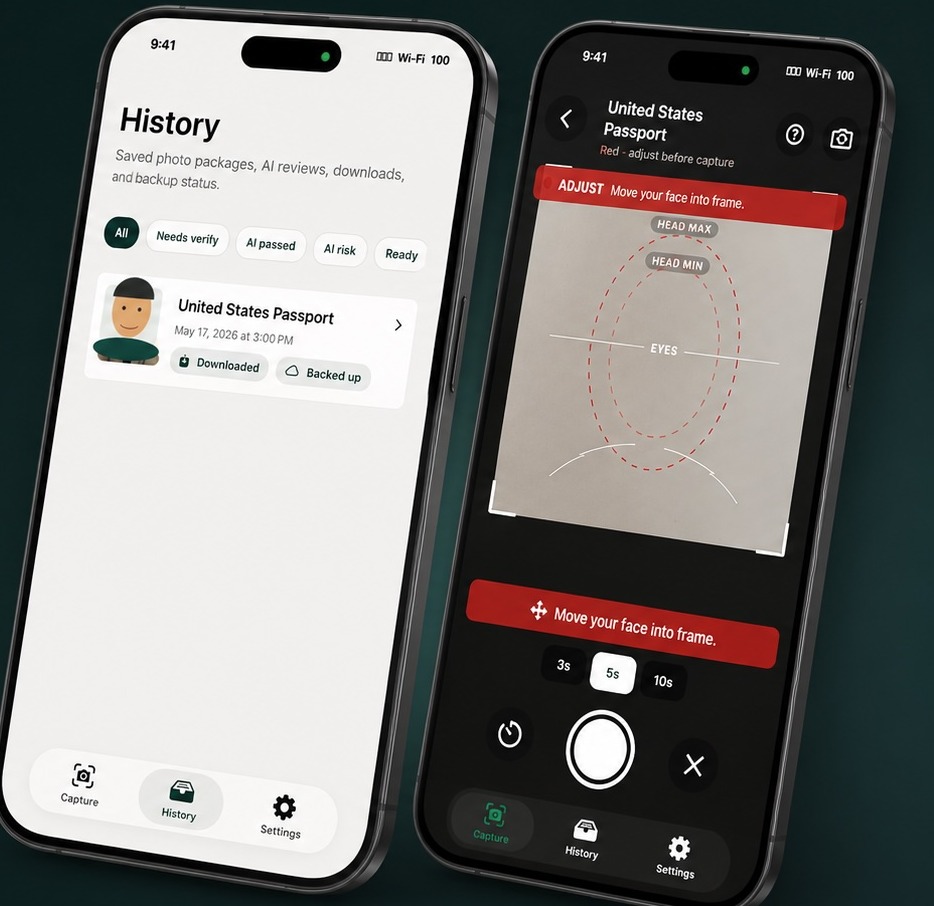
The 2.0 preview shows country and photo-type selection, guided capture, AI verify, package download, file variants, backup, and purchase recovery.
Portrait reference image licensed from Adobe Stock: asset 538858102
Feedback from real-world ID photo tasks: file variants, capture guidance, review confidence, and recovery after purchase.
“I liked that the app did not force AI edits into the official file. I could keep the original and compare the white-background version.”
“The eye line and head-size guide made it easier to take the photo myself instead of guessing after every shot.”
“I needed a visa upload JPEG and a print layout. Having both files in one package saved me a lot of back and forth.”
“The history page is useful because I can reopen the package and share the files again without rebuilding everything.”
“AI verify feels like a second pair of eyes. It pointed me to the rules without changing my face or the original photo.”
“The separate AI Beautify copy is exactly what I wanted. It is there if I need it, but it does not replace the compliance version.”
Head-size, eye-line, framing, timer, and capture-state feedback help you correct distance and placement before taking the photo.
Use supported passport, visa, immigration, citizenship, PR card, DV lottery, and Hong Kong SAR photo routes with their own crop and export rules.
Export the single photo, a 4 x 6 print sheet, and print instructions so a home printer or photo lab can print at actual size.
Keep original package files, add an optional AI white-background set, and add an optional AI beauty set without replacing the official output.
Run a separate paid review for glasses or lens rules, expression, facial-edge visibility, background, size, crop, and print metadata.
Saved packages preserve original, AI white-background, and AI beauty outputs where available, with download recovery and iCloud backup support.
The app is designed around the parts users usually get wrong: framing, head size, background, print layout, country-specific glasses rules, and final review.
Select a supported country and photo type, including U.S., Canada, UK, Australia, New Zealand, and Hong Kong SAR routes.
Use live guidance to frame the face before taking the photo.
Review local checks, keep the original, or add optional AI white-background and AI verify runs.
Unlock one saved package to save or share available upload JPEGs, print layouts, and print instructions.
AI verify reviews risk without changing the photo. AI beauty creates a separate enhanced copy. Basic capture, preview, local checks, and export preparation do not require sending a photo to the server.
A quick buyer-fit summary so you can decide before you download. PassSnap is built for a specific job — here is where it fits and where it does not.
PassSnap is an iPhone app distributed through the Apple App Store. It is not currently available on Android, Windows, or as a browser-based tool. Guided capture, local checks, and package export are built around the iOS camera and StoreKit purchase flow. Check the App Store listing for the current minimum iOS version and supported iPhone models before downloading.
Yes. Each person's photo is captured and saved as its own package, and the $4.99 package unlock applies to that single saved package rather than to an account-wide plan. If you are preparing photos for a partner, child, or parent, capture and unlock each person's package separately; optional AI verify and AI beauty purchases work the same way, per package.
A pharmacy booth or studio produces a photo on the spot but requires an appointment or store visit and a per-visit fee. Generic photo-editing apps can crop and touch up an image, but they do not encode passport-office-specific head-size, position, or background rules, so mistakes can pass unnoticed. PassSnap runs country-specific crop and background rules at home on your schedule, and optional AI verify checks the result against the same rule set before you rely on it.
All in-app purchases go through Apple StoreKit, so refunds follow Apple's standard App Store process: request one directly from Apple through "Report a Problem" in the App Store or at reportaproblem.apple.com. Under PassSnap's Terms of Service, paid features are non-refundable once delivered except where required by law or by Apple, but [email protected] can help with access, package recovery, or purchase questions.
Verified ratings and written reviews are published on PassSnap's official App Store listing, moderated by Apple rather than by us.
Guided capture and local checks compare head size, eye line, and framing against the published specification for the selected country and photo type before export. Optional AI verify runs a separate server-side pass against the same rule set, covering glasses or lens rules, expression, facial-edge visibility, background, size, crop, and print metadata, and reports risk rather than silently approving or rejecting. It is a review aid, not a guarantee that the receiving authority will accept the photo.
Email [email protected] for access, purchase, or package questions. Purchase recovery restores unlocked packages, entitlements, and completed AI reports for matching records, and a copyable recovery code plus optional iCloud backup help you restore packages after reinstalling or switching iPhones. Refunds for in-app purchases follow Apple's standard App Store process at reportaproblem.apple.com.
Basic capture, crop, preview, local checks, and history are designed to run on your device, so using the basic workflow does not upload your photo to PassSnap servers. Optional AI verify and AI beauty upload images only after explicit consent, with the retention window shown at consent and a default target of 7 days or less. iCloud backup uses your private iCloud Drive container and is not used for AI analysis, advertising, or model training, and purchases run through Apple StoreKit so PassSnap never handles your card details.
Full details are in the privacy policy and terms of service.
Version 2.0 adds verified routes for the United States, Canada, United Kingdom, Australia, New Zealand, and Hong Kong SAR where applicant-supplied photos are supported.
Download packages separate AI Beautify, AI white-background, and original outputs, including upload JPEG and print-layout files when applicable.
History, purchase recovery, and iCloud backup are designed to preserve completed AI records and unlocked package access.